
Why Proactive Threat Management Matters for SMEs Today
Most small business owners share one comforting belief: “We are too small for hackers to notice.” It sounds sensible, but it is no longer true.
Today, small and medium enterprises (SMEs) are among the most frequent victims of online crime. Attackers know that smaller companies usually have lighter defences, fewer IT staff, and limited funds to recover after an incident. For a criminal, that makes an SME a convenient target rather than a minor one.
The encouraging part is that you do not need a giant budget to protect your company. You need a smarter plan, and that plan is proactive threat management. Instead of waiting for trouble, you search for weak spots, watch your systems daily, and prepare your team in advance.
In this guide, you will learn what proactive threat management means, why SME cybersecurity has become urgent, which cyber threats for small businesses are most common, and how to start protecting your company today.
What Is Proactive Threat Management?
Proactive threat management is the habit of finding and fixing security problems before attackers can use them. It combines regular checks, round-the-clock monitoring, staff awareness, and a tested recovery plan.
Compare it with reactive security. A reactive business acts only after something breaks: files are locked, money disappears, or customers complain. A proactive business behaves more like a person who visits the doctor for regular check-ups. Small warning signs get attention early, so they never grow into emergencies.
A strong proactive threat management program normally includes:
- Regular risk assessments to uncover weak points
- Continuous monitoring of networks, devices, and user accounts
- Prompt software updates and security patches
- Employee training on safe online habits
- Reliable data backups stored in separate locations
- A written plan for responding to incidents
No single tool delivers all of this. Proactive threat management works best as an everyday routine supported by the right technology and a well-informed team.
Why SME Cybersecurity Is Now a Business Priority
To understand why SME cybersecurity deserves attention, it helps to see your company through an attacker’s eyes.
Weaker Defences Make SMEs Easier Targets
Large corporations employ full security teams and advanced tools. Many smaller firms depend on basic antivirus software and a hopeful attitude. Criminals prefer the path of least resistance, so they head for the easier door.
Even Small Companies Hold Valuable Data
Customer contact details, payment records, employee files, and supplier contracts all carry value on illegal markets. Your business does not need millions of records to make an attack worthwhile.
SMEs Can Be a Gateway to Larger Companies
If you supply a bigger organisation, hackers may break into your systems to reach theirs. This tactic, known as a supply chain attack, is growing quickly, and it puts partners of large firms at special risk.
Limited Time and Staff
In many small companies, one person manages IT, finance, and daily operations together. Security tasks slip down the list. Attackers are well aware of this and rely on it.
Automated Attacks Ignore Company Size
Many attacks are not personal. Automated tools scan thousands of systems every hour, looking for any unlocked door. If your software has a known flaw, the tool will find it, whether you run a local shop or a national brand.
Common Cyber Threats for Small Businesses
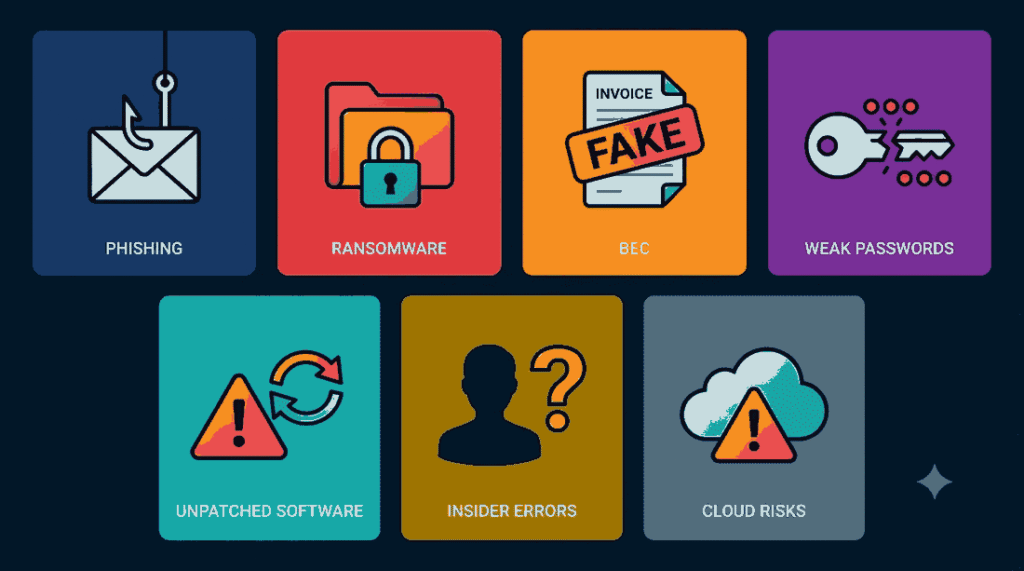
Knowing your enemy makes preparation easier. These are the cyber threats for small businesses that appear most often.
Phishing Emails
Phishing uses fake messages that look genuine. An email may appear to come from your bank, a supplier, or even your manager. One careless click on a bad link or attachment can give criminals direct access to your network.
Ransomware
Ransomware locks your files and demands payment to release them. Picture arriving at work to find every screen displaying a ransom note. Even a few days of downtime can seriously harm a small company.
Business Email Compromise
In this scam, a criminal poses as a senior colleague or trusted vendor and asks for an urgent money transfer or a change of bank details. The request looks routine, so the loss is often discovered too late.
Weak and Reused Passwords
Simple, shared, or repeated passwords hand attackers an easy win. If an employee uses the same password for personal sites and company systems, a leak from any one website can expose your business.
Outdated Software
Software makers release updates to close security gaps. Delaying those updates leaves the gaps open. Many successful attacks exploit flaws that were fixed months earlier.
Human Error
Not every danger comes from outside. A mistyped email address, a lost laptop, or a rushed click can leak sensitive information without any bad intention.
Remote Work and Cloud Risks
Teams now work from home and store data in several cloud services. Personal phones, home Wi-Fi networks, and unmanaged apps all widen the area you need to protect.
The True Cost of Ignoring Small Business Cyber Security
Security can feel like an expense with no visible reward. Yet a serious attack almost always costs far more than prevention. Here is what a single incident can damage.
- Money: Ransom payments, stolen funds, legal fees, repair bills, and regulatory fines add up fast. For a small firm, one incident can erase months of profit.
- Operations: When systems stop, you cannot take orders, send invoices, or pay staff on time. Every hour of downtime means lost income.
- Customer trust: Clients share personal details because they trust you. After a data leak, many never return.
- Reputation: News of a breach spreads quickly through social media and review sites, and it discourages new customers.
- Legal standing: Data protection laws in many countries require businesses to safeguard customer data and report breaches promptly. Failing to do so can bring heavy penalties.
- Survival: Industry studies have repeatedly shown that a significant share of small businesses struggle to continue after a major cyberattack, and some close within months.
Strong small business cyber security is therefore about more than protecting files. It is about protecting your income, your people, and your future.
Reactive Security vs Proactive Threat Management
The difference between the two approaches becomes clear when you compare them side by side.
| Area | Reactive approach | Proactive threat management |
|---|---|---|
| Timing | Acts after an attack | Acts before an attack |
| Detection | Finds breaches weeks or months late | Spots unusual activity early |
| Cost | High recovery and repair bills | Lower, predictable monthly spending |
| Downtime | Long and stressful | Short, with a clear recovery plan |
| Customer confidence | Often damaged | Strengthened |
Put simply, reactive security locks the door after the burglar has left. Proactive threat management makes sure the burglar cannot enter, and that you know the moment someone tries.
Benefits of Proactive Threat Management for SMEs
It Saves Money Over Time
Prevention is nearly always cheaper than recovery. A modest monthly investment in monitoring, updates, and training costs far less than a ransom payment, emergency consultants, and weeks of lost sales.
It Catches Problems Early
Attackers often hide inside a network for a long time before causing visible harm. Proactive threat management helps you notice warning signs sooner, such as a login at 3 a.m. from another country or a sudden flow of data leaving your systems.
It Builds Trust With Clients and Partners
More customers now ask suppliers about their security practices before signing contracts. Strong SME cybersecurity gives you a competitive edge and reassures the people who depend on you.
It Supports Legal Compliance
Many industries require businesses to protect personal data. A proactive approach makes it easier to meet these rules and to show that you took reasonable care if you are ever audited.
It Keeps Your Business Running
Business continuity is the real goal. Even when an incident occurs, a good plan lets you recover quickly and keep serving customers.
It Brings Peace of Mind
Running a company is demanding enough. When you know that systems are monitored, staff are trained, and a plan is ready, you can focus on growth instead of worry.
How Threat Detection and Response Protects Your Business
Threat detection and response is the engine inside proactive threat management. It answers two simple questions: “Is something wrong?” and “What do we do about it?”
Detection means watching your environment for signs of trouble. Monitoring tools can flag strange logins, unusual file transfers, or devices behaving oddly. The earlier you see a problem, the smaller the damage.
Response means acting quickly once a threat is confirmed. This may include isolating an infected computer, blocking a suspicious account, restoring clean data from backups, and informing the right people.
Small companies often lack time for constant watching. That is why many SMEs choose managed threat detection and response services. These providers monitor systems day and night and step in immediately, giving smaller teams access to expert protection at a reasonable monthly cost.
Ten Steps to Build a Proactive Threat Management Plan
You do not have to do everything at once. Work through these steps in order and improve over time.
- Identify what you need to protect. List your devices, software, cloud accounts, and especially your most sensitive data. Ask yourself which information would hurt most if it were lost or stolen.
- Run regular risk assessments. A risk assessment is a health check for your systems. Repeat it at least once a year and whenever you adopt major new tools.
- Keep everything updated. Turn on automatic updates for operating systems, apps, browsers, routers, and website plugins.
- Strengthen passwords and enable multi-factor authentication (MFA). Encourage long, unique passwords through a password manager, and add a second verification step so a stolen password alone cannot open the door.
- Train your employees. Hold short, friendly sessions on spotting phishing and handling data safely. Staff who feel comfortable asking questions report problems faster.
- Monitor continuously. Use monitoring tools or a managed security provider to watch for danger around the clock.
- Back up your data wisely. Keep several copies, including one stored offline or away from your main network, and test restoring from them.
- Limit access. Give people only the access their roles require, and remove accounts promptly when someone leaves.
- Prepare an incident response plan. Decide in advance who to call, who makes decisions, how to isolate systems, and how to inform customers. Keep a printed copy in case computers are down.
- Check your vendors. Your security is only as strong as the partners you work with, so ask suppliers how they protect your data.
Myths About SME Cybersecurity That Put Businesses at Risk
Myth 1: “We are too small to be targeted.”
Reality: Automated attacks do not care about company size, and small firms are often chosen because they are easier to breach.
Myth 2: “Antivirus software is enough.”
Reality: Antivirus is helpful, but it cannot stop phishing, stolen passwords, or many modern attack methods on its own.
Myth 3: “Security is only the IT team’s job.”
Reality: Every employee plays a part, because one careless click can open the door.
Myth 4: “Good protection is too expensive.”
Reality: Many powerful steps, such as MFA, updates, backups, and training, cost very little compared with the price of a breach.
Myth 5: “We have never been attacked, so we are safe.”
Reality: Some businesses have already been breached and simply do not know it yet.
A 30-Day Proactive Threat Management Checklist for SMEs
If you feel overwhelmed, use this simple monthly plan.
Week 1: Build the foundation
- Create a list of devices, software, and key data
- Switch on automatic updates everywhere
- Enable MFA on email, banking, and cloud accounts
Week 2: Protect your data
- Set up automatic backups with one offline copy
- Test restoring a file from backup
- Review who can see sensitive information
Week 3: Prepare your people
- Hold a 30-minute phishing awareness session
- Share a simple rule: “If it feels odd, ask before you click”
- Tell everyone exactly who to contact about suspicious activity
Week 4: Plan and monitor
- Write a basic incident response plan
- Explore monitoring or managed security services within your budget
- Book your first full risk assessment
After thirty days, your company will be noticeably safer. Keep the momentum going with a review every few months.
Should You Manage Threats In-House or Hire Experts?
Some tasks, like enabling MFA or installing updates, are easy to handle yourself. As your company grows, however, expert support becomes valuable. A cybersecurity partner can:
- Monitor your systems twenty-four hours a day
- Respond to threats faster than a busy internal team
- Run regular testing and risk assessments
- Help you meet industry standards
- Offer advice that fits your size and budget
When choosing a provider, look for relevant experience with SMEs, clear and simple communication, transparent pricing, and a strong focus on prevention rather than repair.
Building a Security-First Culture in Your Company
Technology matters, but people matter more. The most effective SME cybersecurity programs treat employees as partners rather than risks.
Encourage staff to report suspicious emails immediately, without fear of blame. A quick report can turn a possible disaster into a minor inconvenience. Thank people for raising alerts, even if they turn out to be false alarms. Over time, habits like locking screens and double-checking unusual requests become second nature.