
DevOps Automation and Automated CI/CD Pipelines: A Simple Guide to Shipping Software Faster
There was a time when releasing software felt like a stressful event. Teams stayed late, copied files by hand, crossed their fingers, and hoped nothing broke in production. One missed step, and the whole weekend was gone.
Today, the best engineering teams ship updates many times a day, and they do it calmly. The secret is not working harder. It is DevOps automation and well-designed automated CI/CD pipelines.
In this guide, you will learn what these terms mean in plain language, how a pipeline works from start to finish, which tools to consider, and how to build your own pipeline step by step. No jargon overload, just clear explanations you can act on.
What Is DevOps Automation?
DevOps is a way of working that brings development (the people who write code) and operations (the people who run it) together. The goal is simple: deliver good software quickly and keep it reliable.
DevOps automation means using tools and scripts to handle repetitive tasks that people used to do by hand. These tasks include:
- Building and compiling code
- Running tests
- Setting up servers and environments
- Deploying new versions
- Monitoring systems and sending alerts
- Scanning for security problems
Think of it like a dishwasher. You could wash every plate by hand, but a machine does it the same way every time, without getting tired or forgetting a step. Automation gives your team the same gift: consistent results and more time for work that needs human creativity.
Why Manual Processes Cause Problems
Manual work is not just slow. It is risky. Here is what usually goes wrong:
- Human error. Someone skips a step or types the wrong command.
- Inconsistency. Two people deploy the same app in two different ways.
- Slow feedback. Bugs are found days after the code was written, when nobody remembers the details.
- Bottlenecks. Only one person knows how to release, so everything waits for them.
- Burnout. Repetitive late-night releases wear teams down.
Automation removes these problems by turning knowledge that lives in people’s heads into code that anyone can read, review and improve.
What Does CI/CD Mean?
CI/CD is the heart of DevOps automation. The letters stand for three related ideas.
Continuous Integration (CI)
Continuous integration means developers merge their code changes into a shared repository often, ideally several times a day. Every time they do, an automated process builds the code and runs tests.
The benefit is fast feedback. If a change breaks something, you find out in minutes, while the change is still fresh and small.
Continuous Delivery (CD)
Continuous delivery extends CI. After the code passes all tests, it is automatically packaged and prepared for release. The software is always in a “ready to ship” state. A person usually presses a final approval button to push it live.
Continuous Deployment (CD)
Continuous deployment goes one step further. There is no approval button. If the code passes every automated check, it goes straight to production. This works best for teams with strong test coverage and monitoring.
Quick Comparison
| Practice | What it automates | Human approval before production? |
| Continuous Integration | Build and test on every code change | Not applicable |
| Continuous Delivery | Everything up to a release-ready package | Yes |
| Continuous Deployment | Everything including the live release | No |
Together, these practices form a CI/CD pipeline: an automated path that carries code from a developer’s laptop all the way to your users.
How an Automated CI/CD Pipeline Works
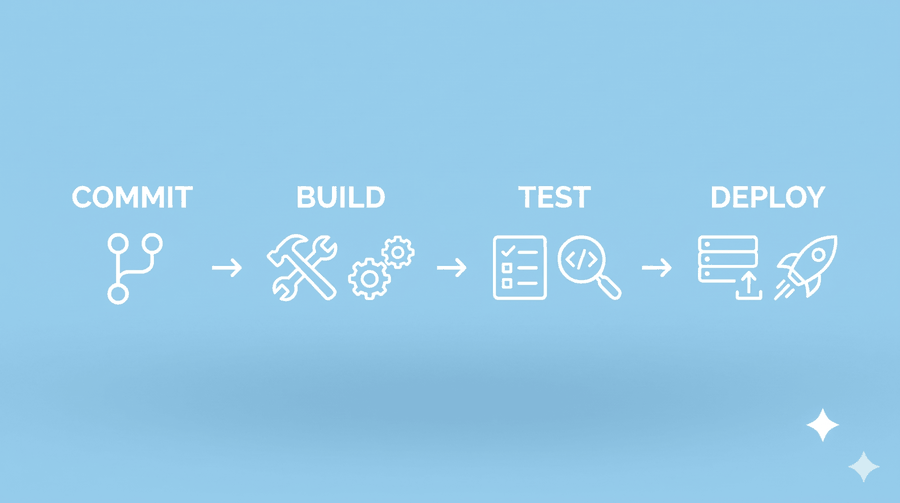
A pipeline is a series of stages. Each stage must succeed before the next one begins. If anything fails, the pipeline stops and tells the team right away. Here is a typical flow.
Stage 1: Source
It all starts when a developer pushes code to a version control system such as Git. This push (or a pull request) triggers the pipeline automatically. Nobody has to click “start.”
Stage 2: Build
The pipeline pulls the latest code and builds it. Depending on your project, this might mean compiling code, installing dependencies, or creating a Docker image. A failed build is the first warning sign that something is wrong.
Stage 3: Test
Automated tests run next. A healthy pipeline usually includes several layers:
- Unit tests check small pieces of code in isolation.
- Integration tests make sure different parts work together.
- End-to-end tests simulate real user actions.
- Performance tests check that the app stays fast under load.
Fast tests should run first. If a quick unit test fails, there is no reason to wait for a slow end-to-end test.
Stage 4: Security and Quality Checks
Modern pipelines also scan code for problems before release. This approach is often called DevSecOps, because security becomes part of the daily workflow instead of a last-minute review. Common checks include:
- Static code analysis for bugs and bad patterns
- Dependency scanning for known vulnerabilities
- Secret detection to catch passwords accidentally committed to code
- Container image scanning
Stage 5: Package and Store
Once everything passes, the pipeline creates a deployable artifact, such as a container image or a compiled package, and stores it in a registry. Each artifact gets a version number, so you always know exactly what is running and can roll back if needed.
Stage 6: Deploy
The artifact is deployed first to a staging environment that mirrors production. After final checks, it moves to production. Smart deployment strategies reduce risk here (more on those below).
Stage 7: Monitor and Learn
The pipeline does not end at deployment. Monitoring tools watch performance, errors and user behavior. If something looks wrong, alerts go out, or an automatic rollback kicks in. What you learn feeds back into the next code change, which is why DevOps is often drawn as an endless loop.
The Real Benefits of DevOps Automation and CI/CD
Why are so many companies investing in automated pipelines? Because the results are measurable.
Faster Releases
When building, testing and deploying are automated, a release that once took days can take minutes. Teams can respond to customer feedback and market changes much faster.
Higher Quality Software
Tests run on every change, so bugs are caught early, when they are cheap and easy to fix. Fewer bugs reach your customers.
Lower Risk
Small, frequent releases are far safer than giant, rare ones. If something breaks, you know exactly which small change caused it, and you can undo it quickly.
Better Team Morale
Nobody enjoys repetitive manual work. Automation frees developers and operations engineers to focus on building features and solving interesting problems.
Cost Savings
Less rework, fewer outages and fewer wasted hours add up. Automation also helps you use cloud resources more efficiently by creating and tearing down environments on demand.
Consistency and Compliance
A pipeline runs the same way every time and keeps a clear record of who changed what and when. That audit trail makes compliance and troubleshooting much easier.
Key Areas of DevOps Automation Beyond CI/CD
Pipelines are the star of the show, but several other practices complete the picture.
Infrastructure as Code (IaC)
Instead of clicking through a cloud console to create servers, you describe your infrastructure in code files using tools like Terraform, Pulumi or AWS CloudFormation. The same files can build identical environments again and again, and they can be reviewed and versioned just like application code.
Configuration Management
Tools such as Ansible, Chef and Puppet make sure every server is set up the same way, with the right software and settings. This removes the classic problem of “it works on my machine.”
Containerization and Orchestration
Docker packages an application with everything it needs to run. Kubernetes then manages those containers at scale, handling restarts, scaling and updates automatically. Together they make deployments predictable.
Automated Monitoring and Alerting
Tools like Prometheus, Grafana and Datadog track system health around the clock. Automated alerts tell the right people when something needs attention, often before customers notice a problem.
GitOps
GitOps uses Git as the single source of truth for both application and infrastructure. When you merge a change into the main branch, an automated process updates your live environment to match. Every change is traceable and reversible.
Popular CI/CD and DevOps Automation Tools
There is no single “best” tool. The right choice depends on your team size, budget, tech stack and where your code lives. Here are well-known options in each category.
CI/CD platforms
- GitHub Actions: built into GitHub, great for teams already hosting code there.
- GitLab CI/CD: an all-in-one platform with source control, pipelines and security scanning.
- Jenkins: a flexible, open-source veteran with a huge plugin library.
- Circle CI: a fast, cloud-based option known for good developer experience.
- Azure DevOps Pipelines: a strong fit for Microsoft-centered teams.
- AWS CodePipeline: a natural choice for AWS-heavy environments.
- Argo CD: a popular GitOps tool for Kubernetes deployments.
Infrastructure and configuration
- Terraform, Pulumi, AWS Cloud Formation
- Ansible, Chef, Puppet
Containers
- Docker, Kubernetes, Helm
Monitoring and observability
- Prometheus, Grafana, Datadog, New Relic, the ELK Stack
Security
- SonarQube, Snyk, Trivy, HashiCorp Vault
Pro tip: Start small. Pick one CI/CD platform and learn it well before adding more tools. A simple pipeline that works beats a complicated one nobody understands.
Deployment Strategies That Reduce Risk
Automation lets you release in smarter ways. Three popular strategies are worth knowing.
Blue-Green Deployment
You run two identical environments. “Blue” serves live traffic while you deploy the new version to “green.” After testing, you switch traffic over to green. If something goes wrong, you switch back in seconds.
Canary Deployment
You release the new version to a small group of users first, perhaps five percent. If metrics look healthy, you gradually increase the share until everyone has the update. If errors spike, you stop and roll back with limited impact.
Rolling Deployment
Instances of your application are updated a few at a time, so the service stays available throughout the process.
Feature flags add one more layer of safety. They let you ship code to production but keep new features switched off until you are ready, so “deploying” and “releasing” become two separate decisions.
How to Build Your First Automated CI/CD Pipeline: Step by Step
Ready to get started? Follow this practical roadmap.
Step 1: Put Everything in Version Control
Store your application code, configuration and infrastructure files in Git. If it is not in version control, it cannot be automated reliably.
Step 2: Choose a Simple Branching Strategy
Many teams use trunk-based development, where developers merge small changes to the main branch frequently. Short-lived branches reduce painful merge conflicts and keep integration smooth.
Step 3: Automate the Build
Create a pipeline file in your repository that installs dependencies and builds your project whenever code is pushed. Get this single stage working before adding more.
Step 4: Add Automated Tests
Start with unit tests, then add integration tests as your pipeline matures. Aim for tests that are fast and reliable. A flaky test that fails randomly will make your team stop trusting the pipeline.
Step 5: Add Security and Quality Scans
Add a dependency scan and a basic code analysis step. Catching a vulnerable library early is much cheaper than fixing it after a breach.
Step 6: Create Repeatable Environments
Use infrastructure as code and containers to build staging and production environments that match each other. Differences between environments are a common source of surprise bugs.
Step 7: Automate Deployment to Staging
Deploy every successful build to staging automatically. Run smoke tests there to confirm that the basics work.
Step 8: Deploy to Production Safely
Start with continuous delivery (manual approval), then move toward continuous deployment as your confidence grows. Use blue-green or canary strategies and have a tested rollback plan.
Step 9: Monitor and Improve
Track your results and tune the pipeline over time. Remove slow steps, fix flaky tests and keep making it better.
Best Practices for Reliable CI/CD Pipelines
These habits separate smooth pipelines from frustrating ones.
- Keep builds fast. Aim for feedback in under ten minutes. Use caching and run tests in parallel.
- Fail fast. Put quick checks first so problems surface immediately.
- Build once, deploy everywhere. Create one artifact and promote the same artifact through every environment.
- Never store secrets in code. Use a secrets manager and inject credentials at runtime.
- Treat pipeline code like application code. Review it, version it and test it.
- Make failures visible. Send alerts to chat tools like Slack or Microsoft Teams so the team can react quickly.
- Fix a broken build immediately. A red pipeline should be the team’s top priority.
- Automate rollbacks. Being able to undo a release quickly is just as important as being able to ship one.
- Keep environments consistent. Use the same tools and configuration across development, staging and production.
- Document the basics. A short README explaining how the pipeline works helps new team members get up to speed fast.
Common Mistakes to Avoid
Even experienced teams stumble. Watch out for these traps.
- Automating a broken process. If your manual process is chaotic, automation will only make the chaos faster. Simplify first.
- Trying to do everything at once. Build your pipeline in small steps and improve it gradually.
- Ignoring test quality. Automation is only as good as the tests behind it.
- Skipping security. Add scanning early instead of treating it as an afterthought.
- Letting pipelines get slow. Long waits push developers to skip the process.
- Forgetting the culture. DevOps is about collaboration as much as tools. Encourage shared ownership between developers, operations and security teams.
How to Measure Success: Key DevOps Metrics
You cannot improve what you do not measure. The industry widely uses four metrics, often called DORA metrics:
- Deployment frequency: how often you release to production.
- Lead time for changes: how long it takes for a code change to reach production.
- Change failure rate: the percentage of releases that cause problems.
- Time to restore service: how quickly you recover from a failure.
High-performing teams deploy often, move from commit to production quickly, break things rarely and recover fast. Track these numbers over time to see whether your automation efforts are truly paying off.
The Future of DevOps Automation
The field keeps evolving. A few trends are shaping the next few years:
- AI-assisted DevOps. Intelligent tools help write pipeline configurations, predict failing builds, analyze logs and suggest fixes.
- Platform engineering. Companies build internal platforms that give developers self-service access to pipelines and environments, reducing cognitive load.
- Policy as code. Security and compliance rules are written as code and enforced automatically in every pipeline.
- Shift-left security. More testing and security checks move earlier in the development process.
- Sustainability. Teams are looking at efficient pipelines and smarter resource usage to reduce wasted compute.
Frequently Asked Questions
What is the difference between DevOps and CI/CD?
DevOps is a broad culture and set of practices that brings development and operations together. CI/CD is one of the most important technical practices within DevOps. It automates how code is built, tested and released.
Is CI/CD only for large companies?
No. Small teams and even solo developers benefit greatly. Free tiers on platforms like GitHub Actions and GitLab make it easy to get started at little or no cost.
How long does it take to set up a CI/CD pipeline?
A basic build-and-test pipeline can be running in a few hours. A mature pipeline with security scanning, multiple environments and advanced deployment strategies usually grows over weeks or months.
What is the best CI/CD tool for beginners?
GitHub Actions and GitLab CI/CD are popular beginner choices because they are built into the platforms where your code already lives and have plenty of tutorials and ready-made templates.
Does automation replace DevOps engineers?
No. Automation removes repetitive tasks, but people are still needed to design systems, improve processes, handle complex incidents and make good decisions. The role shifts toward higher-value work.
What skills are needed for DevOps automation?
Useful skills include Git, scripting (such as Bash or Python), Linux basics, containers, a cloud platform, infrastructure as code and an understanding of testing and monitoring. Good communication matters just as much.
Final Thoughts
DevOps automation and automated CI/CD pipelines are no longer a luxury. They are the foundation of modern software delivery. By automating builds, tests, security checks and deployments, your team can release faster, catch problems earlier and sleep better at night.
You do not need to build the perfect pipeline on day one. Start with a simple automated build, add tests, then grow step by step. Each small improvement saves time, reduces risk and brings your team closer to calm, confident releases.(contact us)